

Documentation Index

Fetch the complete documentation index at: https://langchain-zh.cn/llms.txt

Use this file to discover all available pages before exploring further.

LangChain v1 是一个专注于构建智能体的、面向生产环境的基础框架。 我们围绕三项核心改进简化了该框架:

create_agent

LangChain 中构建智能体的新标准,替代 langgraph.prebuilt.create_react_agent

Standard content blocks

新的 content_blocks 属性,提供跨提供商的现代 LLM 功能的统一访问。

Simplified namespace

langchain 命名空间已简化,专注于智能体的基本构建块,遗留功能已移至 langchain-classic
要升级,
pip install -U langchain
有关更改的完整列表,请参阅 迁移指南

create_agent

create_agent 是 LangChain 1.0 中构建智能体的标准方式。它提供了比 langgraph.prebuilt.create_react_agent 更简单的接口,同时通过使用 middleware 提供了更大的自定义潜力。
from langchain.agents import create_agent

agent = create_agent(
    model="claude-sonnet-4-6",
    tools=[search_web, analyze_data, send_email],
    system_prompt="You are a helpful research assistant."
)

result = agent.invoke({
    "messages": [
        {"role": "user", "content": "Research AI safety trends"}
    ]
})
在底层,create_agent 基于基本的智能体循环构建——调用模型,让它选择要执行的工具,然后在它不再调用任何工具时结束:
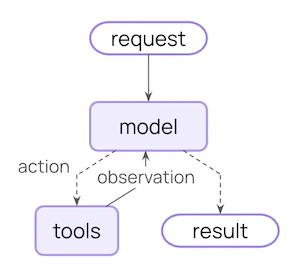
核心智能体循环图
更多信息,请参见 Agents

Middleware

Middleware 是 create_agent 的定义特性。它提供了一个高度可定制的入口点,提高了您能构建内容的上限。 优秀的智能体需要 上下文工程:在正确的时间将正确的信息传递给模型。Middleware 帮助您通过可组合的抽象控制动态提示、对话摘要、选择性工具访问、状态管理和护栏。

Prebuilt middleware

LangChain 为常见模式提供了一些 预构建中间件,包括:
from langchain.agents import create_agent
from langchain.agents.middleware import (
    PIIMiddleware,
    SummarizationMiddleware,
    HumanInTheLoopMiddleware
)


agent = create_agent(
    model="claude-sonnet-4-6",
    tools=[read_email, send_email],
    middleware=[
        PIIMiddleware("email", strategy="redact", apply_to_input=True),
        PIIMiddleware(
            "phone_number",
            detector=(
                r"(?:\+?\d{1,3}[\s.-]?)?"
                r"(?:\(?\d{2,4}\)?[\s.-]?)?"
                r"\d{3,4}[\s.-]?\d{4}"
			),
			strategy="block"
        ),
        SummarizationMiddleware(
            model="claude-sonnet-4-6",
            trigger={"tokens": 500}
        ),
        HumanInTheLoopMiddleware(
            interrupt_on={
                "send_email": {
                    "allowed_decisions": ["approve", "edit", "reject"]
                }
            }
        ),
    ]
)

Custom middleware

您也可以构建自定义中间件以满足您的需求。中间件在智能体执行的每一步都暴露钩子:
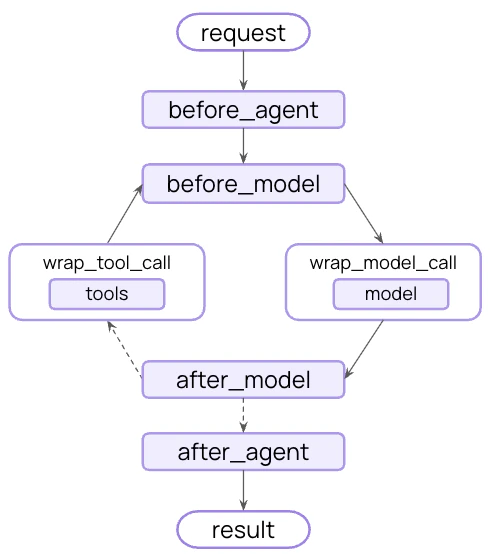
中间件流程图
通过在 AgentMiddleware 类的子类上实现以下任何钩子来构建自定义中间件:
HookWhen it runsUse cases
before_agentBefore calling the agentLoad memory, validate input
before_modelBefore each LLM callUpdate prompts, trim messages
wrap_model_callAround each LLM callIntercept and modify requests/responses
wrap_tool_callAround each tool callIntercept and modify tool execution
after_modelAfter each LLM responseValidate output, apply guardrails
after_agentAfter agent completesSave results, cleanup
示例自定义中间件:
from dataclasses import dataclass
from typing import Callable

from langchain_openai import ChatOpenAI

from langchain.agents.middleware import (
    AgentMiddleware,
    ModelRequest
)
from langchain.agents.middleware.types import ModelResponse

@dataclass
class Context:
    user_expertise: str = "beginner"

class ExpertiseBasedToolMiddleware(AgentMiddleware):
    def wrap_model_call(
        self,
        request: ModelRequest,
        handler: Callable[[ModelRequest], ModelResponse]
    ) -> ModelResponse:
        user_level = request.runtime.context.user_expertise

        if user_level == "expert":
            # More powerful model
            model = ChatOpenAI(model="gpt-5")
            tools = [advanced_search, data_analysis]
        else:
            # Less powerful model
            model = ChatOpenAI(model="gpt-5-nano")
            tools = [simple_search, basic_calculator]

        return handler(request.override(model=model, tools=tools))

agent = create_agent(
    model="claude-sonnet-4-6",
    tools=[
        simple_search,
        advanced_search,
        basic_calculator,
        data_analysis
    ],
    middleware=[ExpertiseBasedToolMiddleware()],
    context_schema=Context
)
更多信息,请参见 完整的中间件指南

Built on LangGraph

因为 create_agent 是基于 LangGraph 构建的,所以您自动获得了对长运行和可靠智能体的内置支持,通过:

Persistence

会话在跨会话时自动持久化,具有内置的检查点功能

Streaming

实时流式传输令牌、工具调用和推理轨迹

Human-in-the-loop

暂停智能体执行以在敏感操作前获得人类批准

Time travel

将对话回退到任何时间点并探索替代路径和提示
您不需要学习 LangGraph 即可使用这些功能——它们开箱即用。

Structured output

create_agent 改进了结构化输出生成:
  • Main loop integration:结构化输出现在在主循环中生成,而不是需要额外的 LLM 调用
  • Structured output strategy:模型可以选择调用工具或使用提供商侧的结构化输出生成
  • Cost reduction:消除了额外 LLM 调用的额外费用
from langchain.agents import create_agent
from langchain.agents.structured_output import ToolStrategy
from pydantic import BaseModel


class Weather(BaseModel):
    temperature: float
    condition: str

def weather_tool(city: str) -> str:
    """Get the weather for a city."""
    return f"it's sunny and 70 degrees in {city}"

agent = create_agent(
    "gpt-4.1-mini",
    tools=[weather_tool],
    response_format=ToolStrategy(Weather)
)

result = agent.invoke({
    "messages": [{"role": "user", "content": "What's the weather in SF?"}]
})

print(repr(result["structured_response"]))
# results in `Weather(temperature=70.0, condition='sunny')`
错误处理:通过 ToolStrategyhandle_errors 参数控制错误处理:
  • Parsing errors:模型生成的数据与所需结构不匹配
  • Multiple tool calls:模型为结构化输出架构生成了 2 个或更多工具调用

Standard content blocks

内容块支持目前仅适用于以下集成:更广泛的内容块支持将逐渐扩展到更多提供商。
新的 content_blocks 属性引入了跨提供商工作的消息内容的标准表示形式:
from langchain_anthropic import ChatAnthropic

model = ChatAnthropic(model="claude-sonnet-4-6")
response = model.invoke("What's the capital of France?")

# Unified access to content blocks
for block in response.content_blocks:
    if block["type"] == "reasoning":
        print(f"Model reasoning: {block['reasoning']}")
    elif block["type"] == "text":
        print(f"Response: {block['text']}")
    elif block["type"] == "tool_call":
        print(f"Tool call: {block['name']}({block['args']})")

Benefits

  • Provider agnostic:无论提供商如何,使用相同的 API 访问推理轨迹、引用、内置工具(网络搜索、代码解释器等)和其他功能
  • Type safe:所有内容块类型的完整类型提示
  • Backward compatible:标准内容可以 延迟加载,因此没有相关的破坏性更改
更多信息,请参见我们的 内容块指南

Simplified package

LangChain v1 简化了 langchain 包命名空间,专注于智能体的基本构建块。精简后的命名空间暴露了最有用和最相关的功能:

Namespace

ModuleWhat’s availableNotes
langchain.agentscreate_agent, AgentStateCore agent creation functionality
langchain.messagesMessage types, content blocks, trim_messagesRe-exported from langchain-core
langchain.tools@tool, BaseTool, injection helpersRe-exported from langchain-core
langchain.chat_modelsinit_chat_model, BaseChatModelUnified model initialization
langchain.embeddingsEmbeddings, init_embeddingsEmbedding models
其中大多数是从 langchain-core 重新导出的,以便为您提供用于构建智能体的聚焦 API 表面。
# Agent building
from langchain.agents import create_agent

# Messages and content
from langchain.messages import AIMessage, HumanMessage

# Tools
from langchain.tools import tool

# Model initialization
from langchain.chat_models import init_chat_model
from langchain.embeddings import init_embeddings

langchain-classic

遗留功能已移至 langchain-classic,以保持核心包精简且专注。 langchain-classic 中包含:
  • Legacy chains and chain implementations
  • Retrievers (e.g. MultiQueryRetriever or anything from the previous langchain.retrievers module)
  • The indexing API
  • The hub module (for managing prompts programmatically)
  • langchain-community exports
  • Other deprecated functionality
如果您使用此功能中的任何一项,请安装 langchain-classic
pip install langchain-classic
然后更新您的导入:
from langchain import ...  
from langchain_classic import ...  

from langchain.chains import ...  
from langchain_classic.chains import ...  

from langchain.retrievers import ...  
from langchain_classic.retrievers import ...  

from langchain import hub  
from langchain_classic import hub  

Migration guide

查看我们的 迁移指南 以帮助将代码更新为 LangChain v1。

Reporting issues

请在 GitHub 上报告发现的任何 1.0 问题,并使用 'v1' 标签

Additional resources

LangChain 1.0

阅读公告

Middleware guide

深入探讨中间件

Agents Documentation

完整的智能体文档

Message Content

新的内容块 API

Migration guide

如何迁移到 LangChain v1

GitHub

报告问题或贡献

See also