

部署自定义模型服务器
为了方便起见,我们提供了一个示例模型服务器,您可以用作参考。我们强烈建议以此示例服务器作为起点。 根据您的模型是指令式模型还是对话式模型,您需要分别实现custom_model.py 或 custom_chat_model.py。
添加可配置字段
通常,使用不同参数配置您的模型会很有用。这些参数可能包括温度(temperature)、模型名称(model_name)、最大令牌数(max_tokens)等。 为了让您的模型在 Playground 中可配置,您需要在模型服务器中添加可配置字段。这些字段可用于从 Playground 更改模型参数。 您可以通过在config.py 文件中实现 with_configurable_fields 函数来添加可配置字段。您可以这样做:
在 Playground 中使用模型
部署模型服务器后,您可以在 Playground 中使用它。进入 Playground,并根据您的模型类型选择ChatCustomModel(对话式模型)或 CustomModel(指令式模型)提供者。
输入 URL。Playground 将自动检测可用的端点和可配置字段。然后,您可以使用所需的参数调用模型。
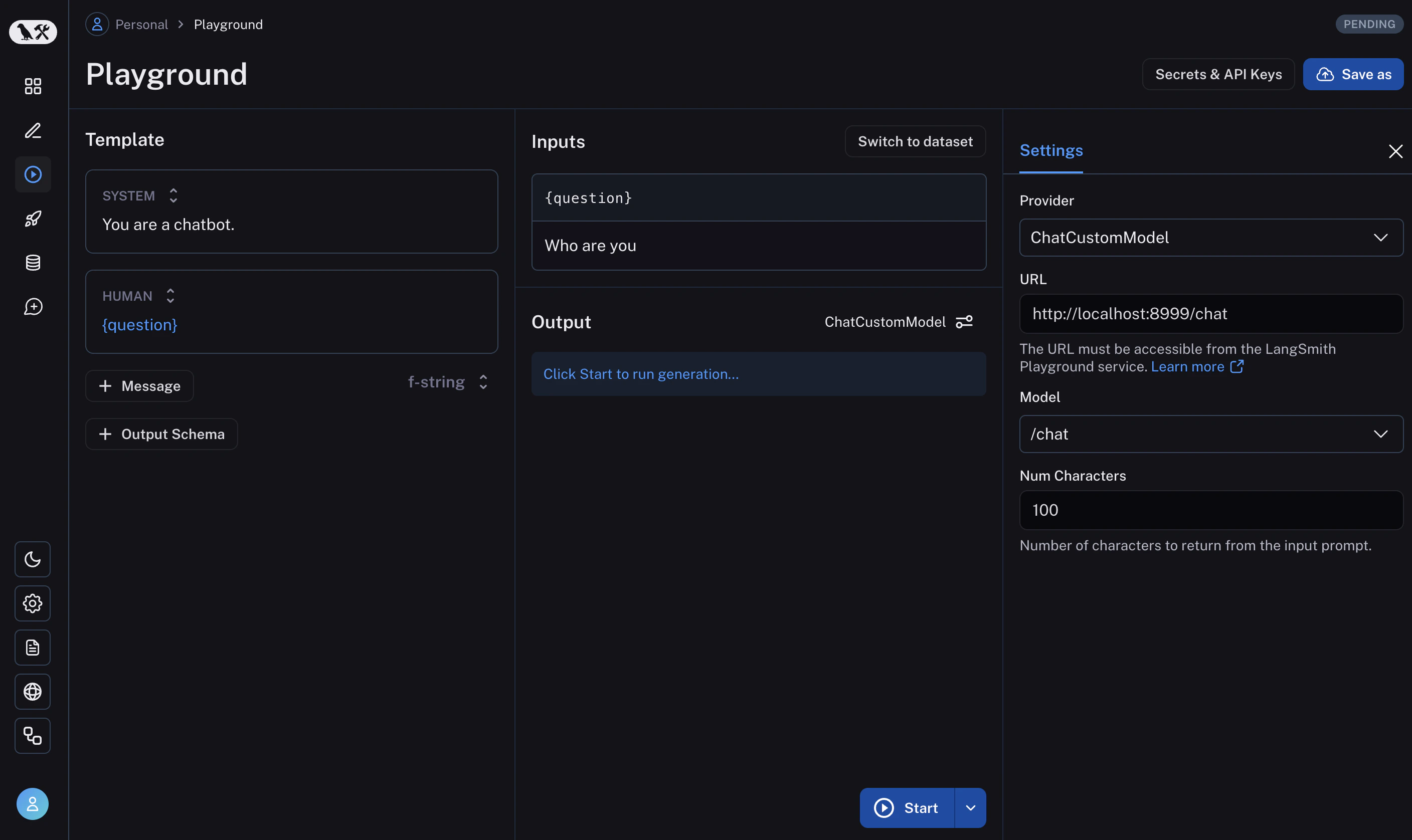
with_configurable_fields 中指定的可配置字段。
更多信息,请参阅如何存储您的模型配置以供后续使用。
Connect these docs to Claude, VSCode, and more via MCP for real-time answers.